As per final post requirements, here are links to my completed play/ reflect activities:
Week 1:
General thoughts
Play/Reflect
Week 2:
Play/ Reflect
Week 3:
Play/ Reflect
Week 4:
Play
Reflect
Week 7:
Play
Reflect
Week 8:
Play
Reflect
Week 9:
Play
Week 11:
Play
Reflect
Week 12:
Reflect
Thinking back to week one I didn't really know what to expect of this unit. I was initially looking forward to blogging, hoping there would be an element of informality and reflection. In the end, as my task management isn't the greatest at the best of times, I found the exercise timely particularly as it seemed that we had to explicitly reference ideas rather than canvas themes. Maybe that was down to my interpretation of the task? In any case, the reflection that I conducted through blog posts allowed me to look beyond my own experiences and critically consider learning objectives.
The creation of Personal Learning Networks (PLNs) is a task that I'd already started carrying out in Semester One through being an active participant of uni orientated facebook pages and designated hashtags on twitter. I've also added several members of my cohort and lecturers to my LinkedIn profile. As I was already signed up to Facebook and Twitter I didn't really have an issue with being signed up to these platforms for class. However, if I wasn't already signed up I'd be resistant to the idea of the uni telling me that it was compulsory, even if this course is about information technology and information programs. Like some other students have chosen to do, I'd likely keep my identity secure through using a different name and no image. The challenge with this would be that exposure to future employers would be limited and classmates wouldn't always know who their classmates are. This could possibly affect the success of PLNs being developed. On the other hand, using your real name and image may not work in your favour if your posts are controversial or irrelevant; considering my online persona and etiquette was important. Despite these concerns, I thought the learning environment operated in a fairly functional manner.
I'm usually a fan of the dual learning mode because I'm based on the Gold Coast. However, I don't think I took advantage of this in INN333 as much as I have in the past. From memory I attended one blackboard collaborate session, no in-class sessions and didn't listen to any recordings. I'm not sure if this is because:
a) there were so few "physical" classes that I'd forget and become complacent or
b) whether it was because I was more concerned with other classes or
c) whether I was happy enough conducting my own learning through the extensive resources provided. I liked the convenience of watching the videos provided in the learning resources and the clear instructions outlined in the play tasks.
I don't want to go into too much of a deep analysis of the collaborate session I participated in but there were technological issues I found frustrating and I wondered if the content discussed was relevant to other students outside the library major. I also think that had the guest speakers been better prepared in regards to the collaborate technology, they would've been made more comfortable addressing the class and as a student, I would've felt more connected to the discussion. In saying this, I thought the content was interesting and offered food for thought in relation to identifying possible service gaps and how information programs could possibly be incorporated to meet user needs and expectations - ideal for assignment two.
Incorporating social media into the learning environment had both pros and cons. These are outlined below:
Pros:
- quick and supportive responses from the cohort
- the sharing of interesting and informative ideas
- got to clarify ideas
Cons:
- sometimes delayed responses from people (although I had high expectations regarding response times because of the precedence set by other classes)
- bombardment of information - it was sometimes a challenge to stay on top of it all
- sometimes challenging to discern what information was highly important and not so important. I think this could've been managed through "pinning" posts on Facebook, emailing important messages to students and encouraging students to use the search capabilities on the group page to identify topics or posts by particular people
- interaction with others on Twitter were limited. I found managing contact on Facebook and blogger took up most of my time and people got in touch with me most on those platforms.
Overall, I found the weekly activities to be enjoyable and I was excited to be introduced to technologies and concepts I'd never heard of or tried before. Many of the new ideas I was introduced to will be revisited throughout my studies and beyond, including: the free screencasting software, Google forms, online curation tools and mashups. I found most technologies easy to grasp (although the screencast software I selected - CamStudio - required some trial-and-error testing) and in hindsight probably I should've selected the more challenging of the play activities to expand my skill set further.
If time permits, I will revisit some activities and concepts because while we were encouraged to look at all topics, you definitely direct your own learning in this unit and I found that I steered away from unfamiliar areas. It's because of this that I would like to get a better understanding of gamification, app construction and open data.
The key learning outcomes I believe I achieved from this unit include:
- the importance of being aware of new technologies, their functionalities and their potential particularly in an information organisation (I believe this knowledge would make me an integral member of an information organisation)
- the cost effectiveness of using these technologies to minimise service gaps and maximise user satisfaction (to encourage service adapatability and highlight user experience mindfulness)
- the scope of information available and the potential for that information to be transformed into new services or technologies (this was highlighted to me in the mashup analysis in week 11)
- that it is important to be aware of other peoples limitations in terms of technology accessibility
I look forward to incorporating these ideas into my studies and future workplaces.
Showing posts with label inn333. Show all posts
Showing posts with label inn333. Show all posts
Saturday, October 26, 2013

Sunday, October 20, 2013
Week Twelve - Reflect Activity
Online applications - a comparison of polling platforms
Pick two online applications (including at least one that you've never used before) to test, evaluate, compare and contrast. They should provide similar function, for example both mind-mapping tools, to-do lists, survey apps, meeting/polling tools etc. Prepare a reflection of at least 300 words or 90 seconds. Do you recommend either for personal or professional use? Why or why not?
Although I didn't choose to do the play activity this week there was a play element to the reflect activity. I wanted to look at polling tools and designed a survey for classmates through Google Drive and Survey Monkey. These tools were then evaluated, compared and contrasted.
The first survey was created through Google Drive. Until this course I wasn't even aware that I was able to create a poll through Google Drive and was excited to try this service. I wanted to find out which tools canvassed in the course, my peers would be likely to use again in their work life. As I wanted to get an idea of all the tools an individual would use in their work life, I allowed participants to select more than one option. I also wanted to find out the popularity of tools, and while the numbers won't be exact, common selections will be able to be viewed. Initially the wording of my question wasn't clear - at first it would've appeared that I only wanted one choice to be selected - this has since been amended.
This polling platform was easy to use and the guided choices simple to follow. I also encouraged discussion about the survey (in terms of its design) on Facebook and people thought the query was worthwhile and would assist in the reflection component of the course.
The results of the survey were displayed in a spreadsheet with a column named "time stamp" and another column outlining the selections made by participants. I liked the idea of the time stamp but the overall aesthetics were displeasing. There was no totalling of responses or graphical element to the data. There may be an option to see it in a graph-type layout, but at this stage, because results are still incoming, this option has not been explored. As a survey participant for another classmates survey, it was found that their survey results were displayed in a graphical format so I would like to explore this occurrence further.
For the second survey I chose to find out the views of my classmates on blogging as part of uni studies through Survey Monkey. This platform was equally as easy to use. I opted to ask four questions in this survey to find out about the blogging experiences of my classmates and these were easy to set up. On Facebook one student expressed that one of the questions was confusing due to the wording and a change was made to improve the clarity.
The results page was colourful and easy to read with data being shown in both graphical and textual formats. The use of percentages also made for an easy to understand break-down of responses. Compared to the Google-based survey, the results analysis provided by Survey Monkey was definitely more straight forward and easy to understand.
Overall, each poll was simple to set up and navigate. In order for the surveys to be effective the content and layout of the content played a key role. Due to the formatting of the results page I believe Survey Monkey is the better of the two tools for professional use. The percentages and graphs make the result display look more professional and easier to figure out the information provided. However, people should be mindful that while Survey Monkey is free for a small number of surveys and responses, it does cost money for those features to be increased. Google forms on the other had are free and would definitely be beneficial for those attempting to undertaking a quick survey or preparing something for personal use.
Sunday, October 13, 2013
Week Eleven - Play Activity
Do the monster mash(up)...
 Sky and footballer images are my own. House image found through SLQ's Picture Queensland collection and is titled "Rear view of Mostyndale homestead Springsure ca. 1917".

 Footballer image is my own. "Jim Owens Chevrolet truck off the road in the Nambour district ca.1925" image found through SLQ's Picture Queensland expired copyright collection.
These images can also be found on my Flickr account here. Eventually I want to attempt other variations of the mashup concept and see what new services or videos I can create.
Sunday, September 22, 2013
Week Nine - Play Activity
QR Codes
I chose to carry out the the basic play activity for week nine. There were two parts to undertake. Part A required students to use a free QR code generator to create a business card for the "About Me" page on their blog. Below are images showcasing the QR code generator I used and the where I embedded the code on my blog (click on images to enlarge).
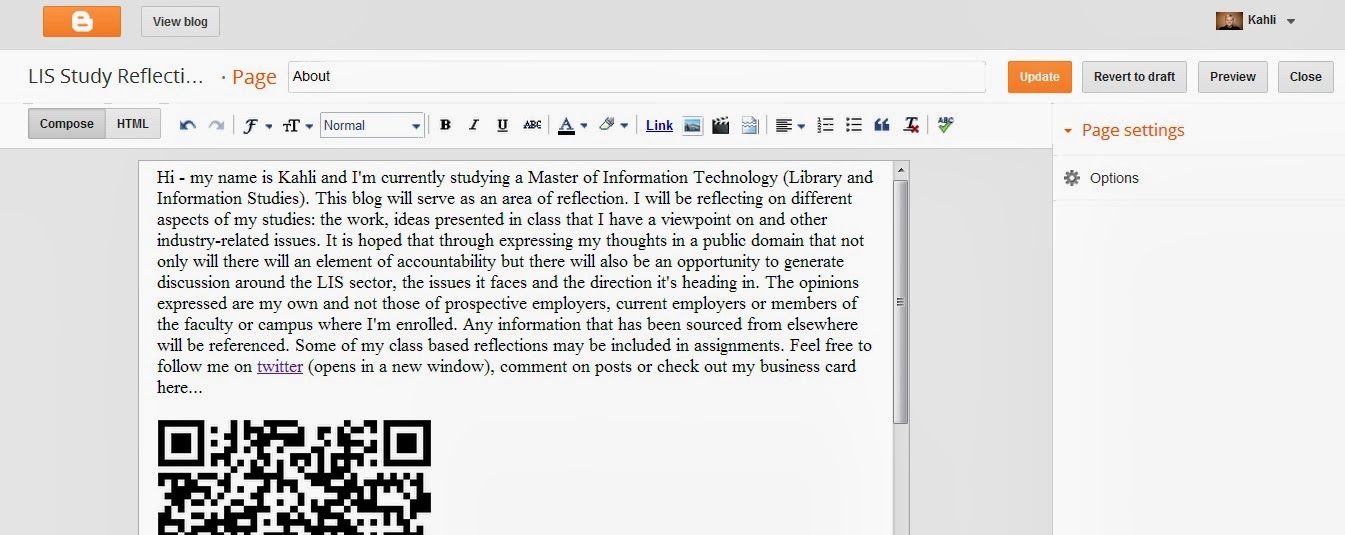

The second part of the basic task required students to download a QR scanner app to their smart phone to scan a QR code with a secret message supplied by the lecturer. The app downloaded is called "Scan" and is extremely simple to use. The code was deciphered using the app and the "hidden" message passed on the lecturer via twitter. As this week's task was completed late in the evening I've decided to add a print screen of the deciphered code below:

I also used the scanner app on my phone to verify whether my QR code business card was successful and I'm pleased to say it was. To view the QR code head to the "About Me" page.
I enjoyed the activity and was excited to download and try a new app. However, I realised following the activity, that if one did not own a smart phone or device, how would the activity be carried out? As I'm fairly new to owning a smart phone, this point stood out to me and while smart device use is prevalent, considerations have to be made for those who don't have access to these technologies. It's for this reason that I believe while QR codes are a unique and convenient way to make information available to people, it shouldn't be a technology relied on by organisations based on exclusivity.
Sunday, September 15, 2013
Week Eight - Play Activity
Screencasting - The good, the bad and the ugly
If you want to skip the spiel and watch my video guide, head to the bottom of my reflections. Feel free to only watch a minute or so as it is a lengthy video. Thank you!
I've always been interested in making instructional videos but never took the time to investigate how I might go about it. The play activity for this week required students to put together a screencast offering a "how to" of a particular library catalogue or database. Excited by the opportunity to test some unfamiliar technology, I chose to show how the Gold Coast libraries catalogue could be accessed from the council page and how you could use the catalogue to find an on-line-accessible audiobook.
It took me some time to find an adequate screen capture tool for the task. VLC media player doesn't capture audio when recording screencasts and I didn't completely trust Screen Capturer Recorder or how long it took to put the video together. I settled on CamStudio and after some menu trawling, was able to find the settings that suited the capture I was looking to record. For your reference, these are the options I selected to put together my video:
It took me some time to find an adequate screen capture tool for the task. VLC media player doesn't capture audio when recording screencasts and I didn't completely trust Screen Capturer Recorder or how long it took to put the video together. I settled on CamStudio and after some menu trawling, was able to find the settings that suited the capture I was looking to record. For your reference, these are the options I selected to put together my video:
- Under "Region" I changed the default setting from "Fixed Region" to "Full Screen".
- Under "Options" I changed the following default settings:
- "Do not record audio" -> "Record audio from speakers"
- "Audio Options for Microphone" -> selected "Internal Mic..." under the "Audio Capture Device" heading
- "Record to Flash Options" -> deselected all options
- Under "Program Options" in the "Options" tab I selected "Minimize program on start recording", "Hide flashing rectangle during recording", "Save settings on exit", "Capture translucent/layered windows"
- "Play AVI file when recording stops" -> "Do not play AVI file"
- "Directory for recording" -> "Use user specified directory..."
- "Name of AVI file" -> "Automatic file naming (use date and time)..."
I also ensured that it stated "Record to AVI" in the top right hand corner of the white CamStudio display.

It is also important to be aware that in order to stop the recording you need to show the hidden icons in the bottom right hand corner of the systray, right click on the CamStudio icon and hit stop. Following this, CamStudio will take a minute or so to compress the file. Once it's finished the compression, you should be able to view your recorded file in a media player. If you decide you want to re-record the capture, triple check your setting adjustments haven't returned to the default settings.
It took me a few attempts to end up with an OK recording; the technology worked fine but my inadequate planning led to lengthy and misguiding instructions. As it is, despite being advised to aim for a 3 minute video, my capture goes for 8 minutes. This may have something to do with the content I was canvassing as well.
Click on the bottom right hand icon to enlarge video
Overall, I'm glad this task pushed me to gain exposure to this technology. I will definitely use screencasting in the future and may even revisit my first attempts to produce something more succinct.
Key points learned from this exercise:
- it pays to do your research into what screen capture tool is right for you
- taking the time to navigate and understand how the tool functions makes the job easier
- have a rough idea of what you're going to say and where you're going to navigate to avoid any surprise results (a script might help even further). This also will enable you to have a shorter, more accessible video.
Week Eight - Reflect Activity
Technologies and service integration
For the reflect activity this week I considered the following questions:
What is the role of podcasting, online video, screencasting or slidecasting in libraries or information organisations? Do you see them as enhancements to the existing work, or services in their own right?
With these questions I wanted to explore each of the technologies and the type of role they could possibly play within libraries and information organisations. Although I focussed on screencasting for my play activity, I have an interest in the other platforms posed in the question. To background briefly, I've listened to podcasts for a few years and while there is are peaks and troughs in my listening consistency, it's good to know that this free and convenient medium exists. Online videos are typically my first port-of-call when it comes to find out how-to do things - the audio or text instructions partnered with real-life visuals makes for an easy to understand and follow guide. Another version of this instructional-type video format, screencasting I've viewed in order to find out about more computer related issues. Slidecasting is a concept that is relatively new to me and I've since taken advantage of in university to access educational presentations.
With this and select course information in mind, when considering the first question it was clear to see what potential role these information delivery formats could play within libraries or information organisations. The technologies and possible uses in information organisations are outlined below:
Podcasts: Offers convenience to users - people can choose when and where they can listen. Would be useful for educational or instructional content. The possibility for audio and video also expands accessibility of information.
Online video: Allows people to choose when they watch and how many times they watch it. Offers and opportunity for information institutions to showcase their institutions and reach a wider audience.
Screencasting: Capturing computer screen processes will be of exponential use to libraries in order to effectively present how library databases are used and informs patrons as to how other areas of their system operates (for example audiobook or ebook loan processes).
Slidecasting: To showcase presentations to a larger audience. Slides offer a clear and succinct way of viewing information and allowing users to control the speed of the slides.
Sunday, September 8, 2013
Week Seven - Reflect Activity
Photo sharing - can it play a role in personal or personal professional life?
This week students were required to reflect on one of three questions posted to Blackboard. I selected the following:
Can you see an application for photo sharing in your personal life? Or your personal professional life? Why or why not?
At first I thought, apart from being able to share photos with friends or tag them in photos I'd taken, there wasn't any practical application of photo sharing. However, upon further reflection and by looking at the idea of photo sharing as an application within a professional context, I was able to see some possibilities. As I'm studying to work in the library and information management sector there are a number of ways photo sharing could be used meaningfully within the workplace. In order to best demonstrate the possible ways in which photo sharing could benefit the LIS sector, I drew table-like diagrams. Links to concepts I made mention of are listed to the right of the images. Click on the image to enlarge.

- The respective Flickr diagrams mentioned can be found here and here. While diagrams and models aren't technically photos, through using a photo sharing platform like Flickr the creators are able to both manage the copyright and share their work.

- A definition of the GLAM concept can be found here.
When finding out about the LIS sector, collaboration and commons I also stumbled across this terrific SlideShare presentation by the National Copyright Unit:
Australian GLAM sector (Galleries, Libraries, Archives and Museums) and Creative Commons from National Copyright Unit, SCSEEC
After reviewing the possibilities of photo sharing in a professional context, I think in my personal life I'd eventually like to contribute to sites like Wikipedia through providing them with any quality work I produce through a creative commons license; it would be a great way to share knowledge and to encourage others to build on ideas.
After reviewing the possibilities of photo sharing in a professional context, I think in my personal life I'd eventually like to contribute to sites like Wikipedia through providing them with any quality work I produce through a creative commons license; it would be a great way to share knowledge and to encourage others to build on ideas.
Week Seven - Play Activity
Post a photo a day - Exploring tags and image sharing
The play activity for week seven required students to post a photo a day for seven days via either Flickr or Instagram. As I was late to prepare my submission, I opted to select seven photos from seven non-consecutive days that I took in the weeks prior to the deadline. These were uploaded to Flickr in one day. The most recent shot was taken on August 20.
To view the photos in my photostream, head here - Kahli's photostream
To view the work of the cohort, head here - Class photos
Initially I just used creative titles and tags that identified whatever the image depicted. However, in order to help others in the INN333 class to find my images (without having to look for the INN333 Week 7 Activity (2013) group) I decided to add course related tags.
In terms of sharing my images with other people, I was happy to showcase my work and aimed to select the photos I found most aesthetically pleasing. While I'm happy for my work to be viewed, I'm not able to commit to the idea of other people using my images. I'm sure most people would do the right thing and credit the picture to the photographer, but I'm still uncertain of what could happen to my work as it moves from person to person.
Sunday, August 18, 2013
Week Four - Reflect activity
Week Four - Reflect activity (18/08/13)
I have put together an audio recording for the Week Four reflect activity answering the questions:
"Can you see a role for libraries in curating content from around the web? Do you think the curation tools we’ve been looking at this week could be used by libraries? How? Why?"
I have put together an audio recording for the Week Four reflect activity answering the questions:
"Can you see a role for libraries in curating content from around the web? Do you think the curation tools we’ve been looking at this week could be used by libraries? How? Why?"
Week Four - Play activity
Curation tools - developing online collections
This week we were tasked to explore curation tools in regards to online content and how these curated items (that bare similarities) can be assembled into a type of "online collection". I chose to look at the curation tool Bundlr and look for items relating to Cyclone Yasi and the impact the disaster had on the local area of Townsville. The reason I selected this topic is because in a previous assignment we were tasked with putting together a digital collection and I wanted to see if Bundlr offered a simple way for aggregating resources.
This is the collection I ended up putting together. It's small at this stage but showcases the variety of online materials relating to the topic that can be found.
A challenge of the curation process was deciding whether to curate individual posts or entire feeds, single videos or complete channels. I settled on putting together individual items allowing for visitors to carry out further investigation if they desire.
I found Bundlr to be easy to navigate, particularly as there is an option to add a browser button that allows you to simply click to add items to your collection. One area that I would've liked included in the Bundlr tool is the option to group items of a similar format. For e.g. videos in one section and news articles in another.
Subscribe to:
Posts (Atom)