In class we looked at the concept of mashups. Mashups, as described in our course notes, are made when data from multiple sources is put together to create new services (Wikipedia), images or videos. For the play activity this week I chose to mashup my own images and images made available to Library Hack participants (here) - in particular those from the State Library of Queensland's Picture Queensland database - to create new images. I used the free image editing software GIMP to put the images together. Although I've used this software in the past, it took a while to work out my technique and strategies to put the selected images together. Through this process I made several mashups and chose to showcase the four I thought turned out most successfully. A description accompanies each picture outlining the origins of the images put together.
Sky and footballer images are my own. House image found through SLQ's Picture Queensland collection and is titled "Rear view of Mostyndale homestead Springsure ca. 1917".
Sky and footballer images are my own. House image found through SLQ's Picture Queensland collection and is titled "Rear view of Mostyndale homestead Springsure ca. 1917".
Sky image is my own. "Panorama of Townsville Queensland" found through SLQ's Picture Queensland expired copyright collection.
Footballer image is my own. "Jim Owens Chevrolet truck off the road in the Nambour district ca.1925" image found through SLQ's Picture Queensland expired copyright collection.
These images can also be found on my Flickr account here. Eventually I want to attempt other variations of the mashup concept and see what new services or videos I can create.
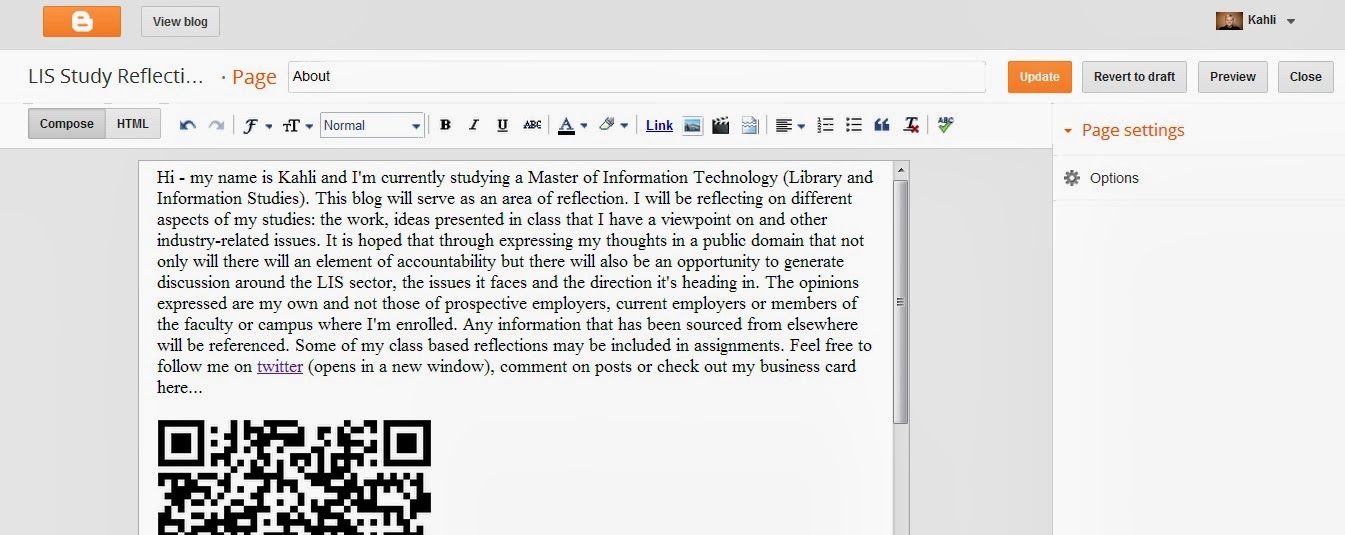
I chose to carry out the the basic play activity for week nine. There were two parts to undertake. Part A required students to use a free QR code generator to create a business card for the "About Me" page on their blog. Below are images showcasing the QR code generator I used and the where I embedded the code on my blog (click on images to enlarge).
The second part of the basic task required students to download a QR scanner app to their smart phone to scan a QR code with a secret message supplied by the lecturer. The app downloaded is called "Scan" and is extremely simple to use. The code was deciphered using the app and the "hidden" message passed on the lecturer via twitter. As this week's task was completed late in the evening I've decided to add a print screen of the deciphered code below:
I also used the scanner app on my phone to verify whether my QR code business card was successful and I'm pleased to say it was. To view the QR code head to the "About Me" page.
I enjoyed the activity and was excited to download and try a new app. However, I realised following the activity, that if one did not own a smart phone or device, how would the activity be carried out? As I'm fairly new to owning a smart phone, this point stood out to me and while smart device use is prevalent, considerations have to be made for those who don't have access to these technologies. It's for this reason that I believe while QR codes are a unique and convenient way to make information available to people, it shouldn't be a technology relied on by organisations based on exclusivity.
If you want to skip the spiel and watch my video guide, head to the bottom of my reflections. Feel free to only watch a minute or so as it is a lengthy video. Thank you!
I've always been interested in making instructional videos but never took the time to investigate how I might go about it. The play activity for this week required students to put together a screencast offering a "how to" of a particular library catalogue or database. Excited by the opportunity to test some unfamiliar technology, I chose to show how the Gold Coast libraries catalogue could be accessed from the council page and how you could use the catalogue to find an on-line-accessible audiobook.
It took me some time to find an adequate screen capture tool for the task. VLC media player doesn't capture audio when recording screencasts and I didn't completely trust Screen Capturer Recorder or how long it took to put the video together. I settled on CamStudio and after some menu trawling, was able to find the settings that suited the capture I was looking to record. For your reference, these are the options I selected to put together my video:
- Under "Region" I changed the default setting from "Fixed Region" to "Full Screen".
- Under "Options" I changed the following default settings:
"Do not record audio" -> "Record audio from speakers"
"Audio Options for Microphone" -> selected "Internal Mic..." under the "Audio Capture Device" heading
"Record to Flash Options" -> deselected all options
Under "Program Options" in the "Options" tab I selected "Minimize program on start recording", "Hide flashing rectangle during recording", "Save settings on exit", "Capture translucent/layered windows"
"Play AVI file when recording stops" -> "Do not play AVI file"
"Directory for recording" -> "Use user specified directory..."
"Name of AVI file" -> "Automatic file naming (use date and time)..."
I also ensured that it stated "Record to AVI" in the top right hand corner of the white CamStudio display.
It is also important to be aware that in order to stop the recording you need to show the hidden icons in the bottom right hand corner of the systray, right click on the CamStudio icon and hit stop. Following this, CamStudio will take a minute or so to compress the file. Once it's finished the compression, you should be able to view your recorded file in a media player. If you decide you want to re-record the capture, triple check your setting adjustments haven't returned to the default settings.
It took me a few attempts to end up with an OK recording; the technology worked fine but my inadequate planning led to lengthy and misguiding instructions. As it is, despite being advised to aim for a 3 minute video, my capture goes for 8 minutes. This may have something to do with the content I was canvassing as well.
Click on the bottom right hand icon to enlarge video
Overall, I'm glad this task pushed me to gain exposure to this technology. I will definitely use screencasting in the future and may even revisit my first attempts to produce something more succinct.
Key points learned from this exercise:
- it pays to do your research into what screen capture tool is right for you
- taking the time to navigate and understand how the tool functions makes the job easier
- have a rough idea of what you're going to say and where you're going to navigate to avoid any surprise results (a script might help even further). This also will enable you to have a shorter, more accessible video.
Post a photo a day - Exploring tags and image sharing
The play activity for week seven required students to post a photo a day for seven days via either Flickr or Instagram. As I was late to prepare my submission, I opted to select seven photos from seven non-consecutive days that I took in the weeks prior to the deadline. These were uploaded to Flickr in one day. The most recent shot was taken on August 20.
To view the work of the cohort, head here - Class photos
Initially I just used creative titles and tags that identified whatever the image depicted. However, in order to help others in the INN333 class to find my images (without having to look for the INN333 Week 7 Activity (2013) group) I decided to add course related tags.
In terms of sharing my images with other people, I was happy to showcase my work and aimed to select the photos I found most aesthetically pleasing. While I'm happy for my work to be viewed, I'm not able to commit to the idea of other people using my images. I'm sure most people would do the right thing and credit the picture to the photographer, but I'm still uncertain of what could happen to my work as it moves from person to person.
For the Reflect task I chose to comment on the following statement:
What role do you think blogging and tweeting will have in
your learning, both in this unit and beyond it? Can you see yourself continuing
to use either a blog or Twitter after this semester?
Blogging and tweeting originally seemed like activities that
would serve more as distractions than learning tools. Admittedly, I have played
around with the blog template on multiple occasions and haven’t always tweeted
the most academic of posts. However, I feel that this is all part of getting to
know a new tool, learning new
technologies and allows you to better use the tool in a constructive way.
For example, using hashtags in twitter has allowed me to link up with students
in the same course and follow interesting posts related to the LIS field. Not
only this, but quick assignment queries can be posted, answered and read by the
cohort through using the hashtag feature – an invaluable trait of twitter. This
connectivity is a perk of both
blogging and tweeting; you’re able to create a name for yourself within your
chosen field, network with likeminded people and get noticed by other industry
professionals (hopefully, and hopefully positively). This also means, if people
are paying attention to your online movements that there is some level of accountability. Posting diary-like
entries on blogger is one way I have found to keep up the internal pact with
myself and the imaginary one I have with readers of my blog: to work
consistently and be a meaningful contributor to the LIS field.
Both tools have pros and cons and these would have to be
weighed up against their value as a learning tool if I were to continue using
them. So far I’ve managed not to get too wrapped up in the rapid fire delivery
of information via twitter and through the course expectations, have managed not
to leave my blog posts too sporadic (says me). I have found that:
-blogging hasn’t provided the best start to networking
with LISprofs (though this may be down to the content I produce)
- it has been
challenging to keep up a consistent commentary for all units through the blog
and
-I’m following a lot of people unrelated to my field of
learning on twitter.
These are issues that may need reviewing if I plan to make
long-term use of these tools.
My expectation is that I will continue to use twitter as a
way to stay abreast of topical issues relating to the LIS field (due to the
number of key commentators/ organisations using this tool) and my contributions
to this area will be less centred around blog posts and have a focus on both
tweets and portfolio updates. I will be interested to see if this view changes
and whether I will have to set up a new way to maintain consistency.
For the play activity this week, we had to set up our blog. In doing so, we had to meet the following requirements (as listed on Blackboard):
Your blog must be public (although you can choose settings that indicate to search engines that you don't want your site to be indexed)
You must allow comments. You can moderate your comments if you are really nervous about this, but you must be committed to moderating them quickly. We recommend choosing a setting that allows you to moderate a comment the first time someone posts, but after that, there comments get posted automatically. There are tools available to help manage comment spam - just check the help information on your chosen platform.
You must have an 'about' page that provides information about you - just the basics!
You must delete sample posts, pages and comments.
You must categorise your posts. Categories are like the table of contents for your blog - broad topics. We recommend using a category for your Play activities and another for your Reflect activities.
You must tag your posts with keywords. Keywords are like the index at the back of a book - narrow topics.
All these aspects were carried out. Over the semester I will be constantly reviewing the 'tags' for each post to ensure that all keywords are identified and listed accordingly. When doing so, I'll be mindful not too include too many identifiers as this may limit the findability and take the content into unrelated areas.
Week Two - Reflect activity
Write a reflection about your online identity. Write about any aspect you choose: what it looks like now, what you want it to look like; what you're willing to share, what you're not willing to share.
My online identity is a mix of censored/ uncensored opinion and public/ private information. This blog was originally going to be a say-exactly-how-I-feel-when-I-feel-it type domain but I was and am too fearful that earlier posts (since deleted) and future posts may do more harm than good. In her advisory video regarding blogs, Kate Davis talks about being the "real you" when you blog content - she said something along the lines of people not believing what you write about if you aren't being yourself. This is probably true, but I feel like some self censoring can be beneficial in the public realm, particularly if your work has the possibility of being read by future employers.
Despite this fear, there have been times when I haven't made the best decisions when posting on social media sites like, facebook for example - this is highly rare though, as I'm extremely paranoid about the possible impact poor decisions could have on me and others. Admittedly, I think my online presence would be minimal if I wasn't enrolled in this course. There are several online platforms where we're encouraged to "put ourselves out there" and interact with people. So far the services that I've been encouraged to use in my studies include: - LinkedIn: for industry networking - Facebook: to communicate with classmates and lecturers - Twitter: to share ideas with industry professionals and peers - YouTube: to document assignment related content - A blogging service: to document course activities, share ideas with peers and industry professionals While each service is beneficial to my studies in some way, my work and personality are put into the public domain so I manage my online identity in several ways: - Use LinkedIn to initially connect with people I know. Establish a professional looking profile before adding industry people (including a tidy resume - omit references to protect identities). - On Facebook, keep content posted to class groups relevant to the discussion and polite in tone. Be appreciative of assistance received using this tool. Don't add people just because they're in my class. - Use Twitter to post a mixture of what I'm interested in and what is relevant to the industry. Use hashtags appropriately and to target attention to certain posts. - Opt to post videos as "Unlisted" until you find out whether the content is constructive to industry-related discussion. - When blogging, watch the tone doesn't become too relaxed, arguments can be supported and tags used effectively. It is hoped that through self-moderating, my online identity will be viewed as being a worthwhile and pleasant presence within various online communities.
This week there was no formal post required but I thought I'd recap on what tasks we had to carry out.
We were encouraged to familiarise ourselves with the unit through checking out the resources on blackboard and reading the study guide. It was also compulsory to set up a Facebook account and join the Facebook group set up for this class. I thought it was interesting that it was a requirement of the course and was keen to see how people would react to this.
As part of signing up to facebook we had to introduce ourselves to our peers through answering the questions outlined below:
who you are
what degree and major you're in
where you're up to with your studies
what you're hoping to get out of the unit
one thing about yourself that no body in the class knows
Below is a print screen of my introductory Facebook post.
The idea of personal learning networks (PLNs) was also introduced. I touched on this briefly in my general thoughts this week and I definitely think that I'll be able to develop as both a student and information professional through harnessing a network with my peers. I think Facebook will make this process easier to some degree though I think it will depend on the level and quality of interactions that take place.
 Sky and footballer images are my own. House image found through SLQ's Picture Queensland collection and is titled "Rear view of Mostyndale homestead Springsure ca. 1917".

 Footballer image is my own. "Jim Owens Chevrolet truck off the road in the Nambour district ca.1925" image found through SLQ's Picture Queensland expired copyright collection.